













np.var の既定は不偏分散ではない|Python の統計計算
同じデータに np.var を当てると 3.6、np.var(data, ddof=1) を当てると 4.0 が返ります。
NumPy の既定は で割るほうです。表計算ソフトや統計の教科書が既定にしている不偏分散とは、割る数が違います。
このずれを含めて、NumPy で基本統計量を出す手順を確かめていきます。
配列にしてから計算する
Python のリストのままでも平均は出せますが、要素を 1 つずつ回すことになります。NumPy の配列にすると、まとめて計算する関数がそのまま使えます。
書き方が短くなるだけではありません。要素の型が配列全体で 1 つに決まるので、途中で型が混ざる心配がなくなります。
import numpy as np

data = np.array([4, 8, 5, 9, 6, 7, 3, 8, 6, 4])
この配列は要素が全部整数なので、型も整数になります。平均や分散を計算する段階で、自動的に浮動小数点へ移ります。
型を明示したいときは dtype を渡します。あとで見るように、型の選び方が結果を変えることがあります。
平均と分散と標準偏差
3 つとも関数が用意されています。出力を右にコメントで添えました。
print(np.mean(data))            # 6.0
print(np.var(data))             # 3.6
print(np.var(data, ddof=1))     # 4.0
print(np.std(data))             # 1.8973665961010275
print(np.std(data, ddof=1))     # 2.0
同じデータから 2 通りの分散が出ています。違いは ddof という引数です。
ddof は「自由度からいくつ引くか」を表します。割る数は で、既定は [1]。
つまり既定は で割る標本分散のほう。母集団の分散を推定したいなら ddof=1 を渡します。
で割る。手元のデータそのもののばらつきを表す値
で割る。母集団の分散を推定するための値
どちらが正しいという話ではありません。ただ、既定がどちらかを知らないまま使うと、 が小さいほど大きくずれます。
なら 3.6 と 4.0 で 11% の差。 なら 25% の差になります。 が 100 を超えれば 1% 程度で、実用上は気にならない。
小さい標本を扱うときほど、この引数を確かめる価値があります。
メソッドとしても呼べる
同じ計算は、配列のメソッドとしても書けます。
print(data.mean())              # 6.0
print(data.var(ddof=1))         # 4.0
print(np.median(data))          # 6.0
print(np.percentile(data, [25, 50, 75]))   # [4.25 6.   7.75]
print(np.ptp(data))             # 6
np.mean(data) と data.mean() はどちらも同じ結果を返します。書きやすいほうを選んで構造上の違いはありません。
中央値は np.median、四分位数は np.percentile です。パーセンタイルはリストで複数まとめて渡せます。
np.ptp は最大値と最小値の差で、この例では 。範囲を見るだけならこれで足ります。
平均 6.0 と中央値 6.0 が一致しているので、この 10 個は左右にあまり偏っていないと読めます。
平均と中央値がずれていたら、外れ値か非対称な分布を疑います。ずれの向きも手がかりで、平均が中央値より大きければ右へ裾を引いている。
四分位数の からも同じことが読めます。下側の と上側の が等しく、中央のまわりが対称です。
2 次元の配列と axis
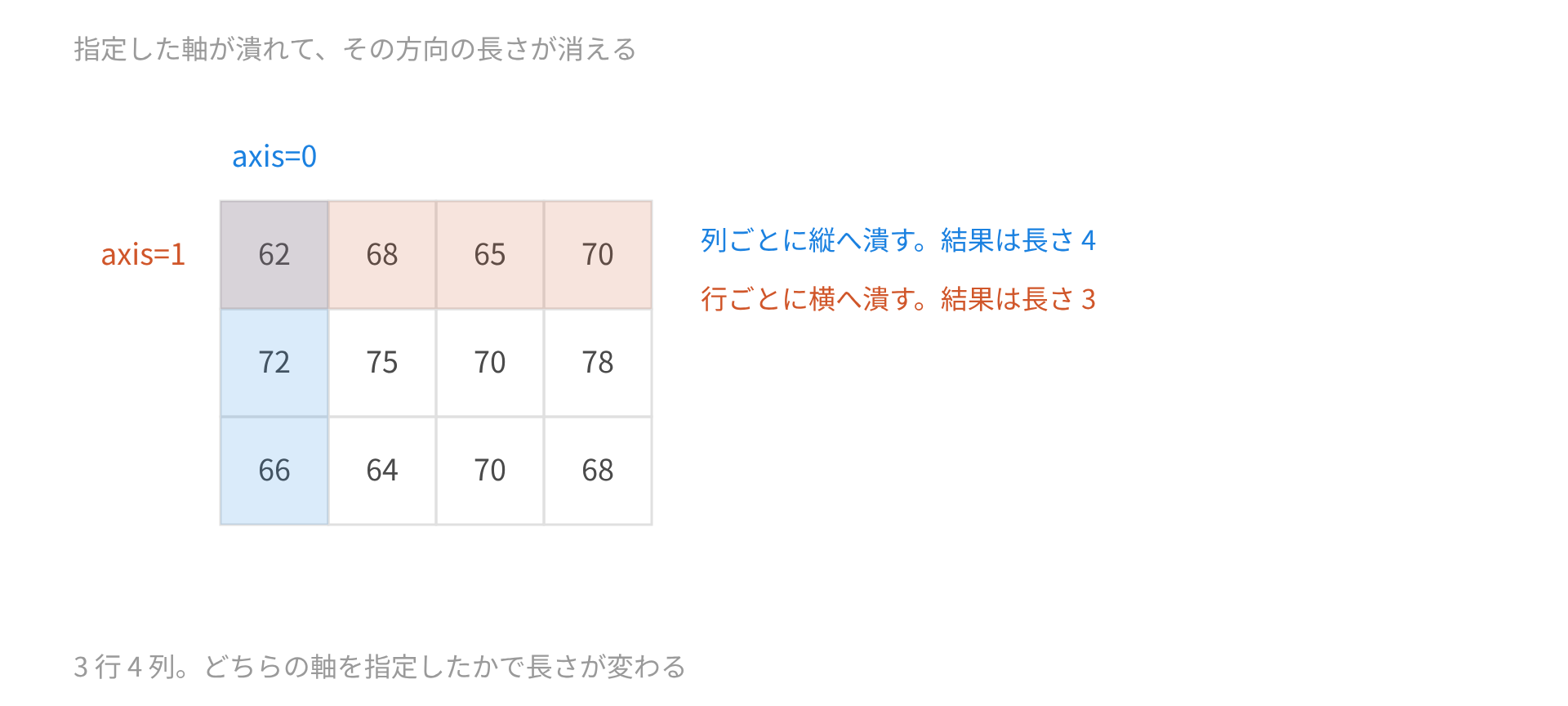
行と列のある配列では、axis でどちらに沿って計算するかを指定します。
score = np.array([
	[62, 68, 65, 70],
	[72, 75, 70, 78],
	[66, 64, 70, 68],
])

print(np.mean(score))
print(np.mean(score, axis=0))
print(np.mean(score, axis=1))
print(np.std(score, axis=1, ddof=1))
出力はこうなります。
69.0
[66.66666667 69.         68.33333333 72.        ]
[66.25 73.75 67.  ]
[3.5       3.5       2.5819889]
axis を省くと配列全体を 1 列に並べて計算します[1]。3 行 4 列の 12 個をまとめた平均が 69.0。
axis=0 を指定すると長さ 4 の結果が、axis=1 を指定すると長さ 3 の結果が返りました。
覚え方は「指定した軸が潰れる」です。axis=0 は行の方向が潰れるので、列ごとの平均が残る。行を縦に足しこんでいるイメージになります。
行と列のどちらを指定したか分からなくなったら、結果の長さを見れば判断できます。長さ 4 なら列ごと、長さ 3 なら行ごと。
大きな配列では速さも変わる
100 万個の平均を、Python の組みこみ関数と NumPy で比べてみます。
import time
import numpy as np

size = 1000000
values = list(range(size))
array = np.arange(size)

start = time.perf_counter()
total = sum(values) / len(values)
plain = time.perf_counter() - start

start = time.perf_counter()
fast = np.mean(array)
quick = time.perf_counter() - start

print(round(plain / quick, 1))
手元の環境では 6 倍前後の差が出ました。絶対の時間は機械によって変わりますが、比のほうは繰り返しても安定しています。
差が出るのは、リストの要素が 1 つずつ別の Python オブジェクトとして置かれているのに対し、配列は同じ型の値が連続して並んでいるためです。
型がそろっているので、1 要素ごとに型を調べる手間がいりません。まとめて足す処理が、そのまま機械の得意な形になります。
データが数百個なら、この差は体感できません。数十万を超えたあたりから効いてきます。
偏差の性質を確かめる
計算が合っているかどうかは、偏差の性質で確かめられます。平均を引いた配列を作り、その合計と 2 乗和を見る。
d = data - data.mean()

print(d.sum())          # 0.0
print((d ** 2).sum())   # 36.0
合計がちょうど になりました。平均の定義からそうなるはずで、ここがずれていれば計算のどこかがおかしい。
2 乗和は 36.0 です。10 で割れば 3.6、9 で割れば 4.0 で、さきほどの分散と一致します。
data - data.mean() のように、配列から数値を引くと全要素に一度に効きます。この書き方ができるのが、リストではなく配列を使う理由のひとつです。
欠測値があるとき
np.nan が 1 つでも混じると、ふつうの関数は nan を返します。
data = np.array([4.0, 8.0, np.nan, 9.0, 6.0])

print(np.mean(data))                        # nan
print(np.nanmean(data))                     # 6.75
print(np.nanstd(data, ddof=1))              # 2.217355782608345
print(np.count_nonzero(~np.isnan(data)))    # 4
nan が返るのは仕様どおりで、欠測に気づかないまま計算が進むより安全です。
無視して計算したいなら nanmean や nanstd を使います。ただし何個を無視したかは自分で数えておく。5 個のうち 4 個で計算した平均を、5 個の平均として報告することになりかねません。
nanstd に ddof=1 を渡したときの割る数は、欠測を除いた個数から 1 を引いた値です。この例なら 。
もとの配列の長さ 5 は使われません。ここをとりちがえると、標準誤差の計算がずれます。
欠測がどこに入っているかも大事です。無作為に抜けているのか、大きい値だけが抜けているのか。後者なら、残った 4 個の平均は母平均の推定にならない。
関数は欠測を落としてくれますが、落としてよいかどうかは判断できません。
精度の注意
浮動小数点の型によって、結果が壊れることがあります。公式の説明でも、float32 では不正確になりうると書かれています[1][2]。
さきほどの 10 個に 10 億を足し、float32 で持ってみます。
small = np.array([4, 8, 5, 9, 6, 7, 3, 8, 6, 4], dtype=np.float32) + np.float32(1e9)

print(np.unique(small))                 # [1.e+09]
print(np.var(small))                    # 16384.0
print(np.var(small, dtype=np.float64))  # 0.0
np.unique が 1 個しか返していません。float32 の有効桁が 7 桁ほどしかないので、10 億に 4 や 8 を足しても区別がつかず、10 個すべてが同じ値に潰れています。
データそのものが失われているので、どんな計算をしても 3.6 は戻りません。それでいて np.var は 16384.0 という値を返す。dtype=np.float64 を指定すると、潰れたデータの正しい分散である 0.0 が出ます。
同じことを float64 でやると、こんどは値が保たれます。
data = np.array([4, 8, 5, 9, 6, 7, 3, 8, 6, 4], dtype=np.float64) + 1e9

print(np.var(data))                                       # 3.6
print(float(np.mean(data * data) - np.mean(data) ** 2))   # 0.0
np.var は 3.6 を正しく返しました。偏差を先に引いてから 2 乗する手順を踏んでいるためです[1]。
下の行は 2 乗和の公式を自分で書いたもので、こちらは 0.0 になります。同じ float64 でも、式の立て方で結果が変わる。
用意されている関数を使うほうが安全だ、という理由がここにあります。数値計算の正確さを試すための標準データも公開されていて、こうした弱さを突く問題が並んでいます[3]。
使う前に確かめる 3 つ
まとめると、確かめておくところは 3 か所です。
ddof の既定が 0 であること
axis を指定したときにどちらが潰れるか
配列の dtype が float64 になっているか
どれも既定のまま使って問題ない場面が多く、だからこそ気づきにくい。小さい標本、大きい数値、欠測のあるデータのときだけ、結果が静かにずれます。
np.std(data) と np.std(data, ddof=1) が返す値の関係はどれですか。
- 前者のほうが小さい
- 前者のほうが大きい
- どちらも同じ
関数の名前を覚えるより、引数の既定を 1 度確かめるほうが早い。NumPy の統計関数はそれで信用できます。
出典



割る数が n と n−1 で、n のほうが大きいので、既定の ddof=0 では小さい値が出ます。n=10 なら 1.897 と 2.000 で、10/9 倍の違いです。